
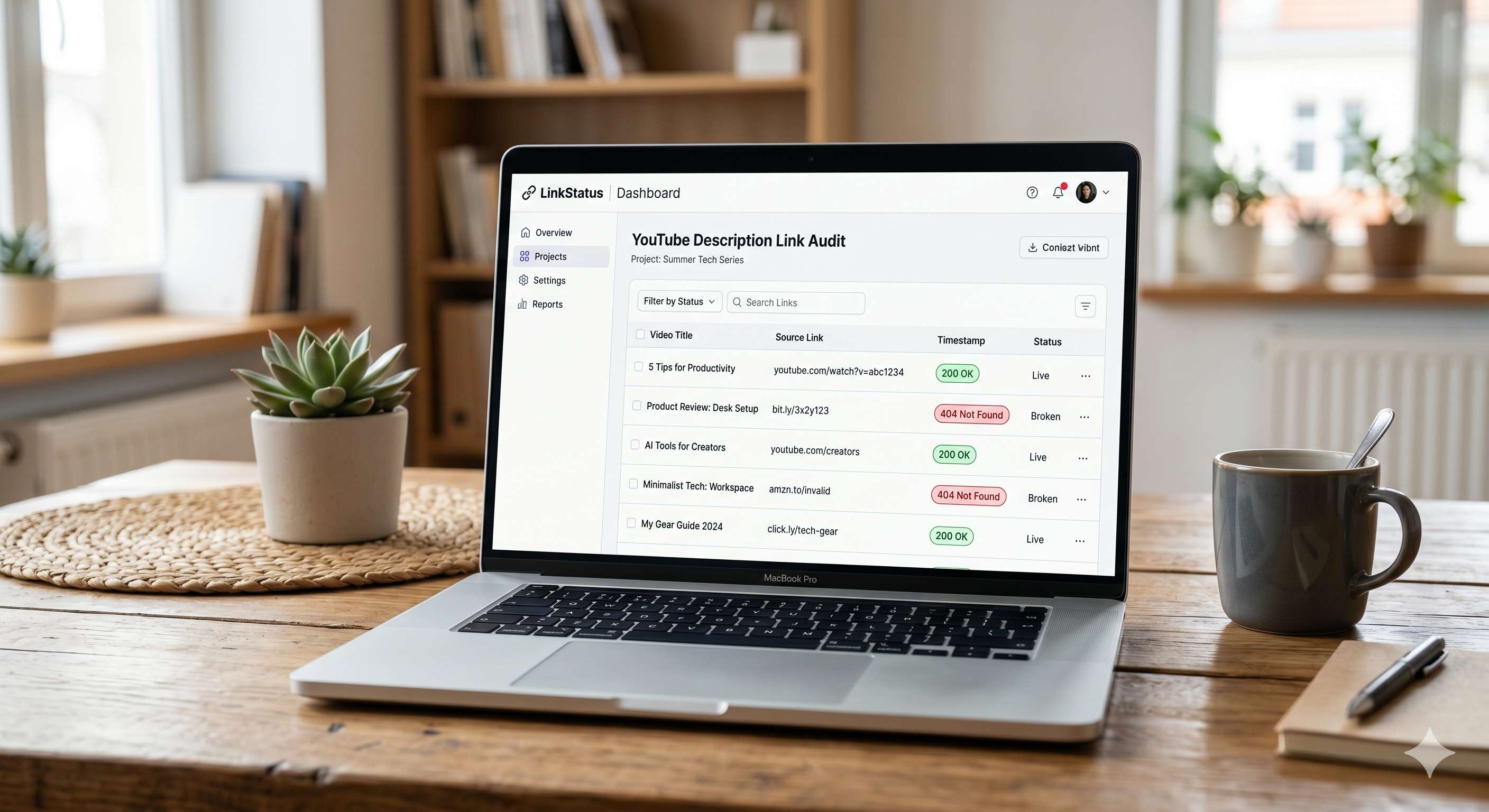
One ugly truth I keep seeing: on mature channels, a shocking slice of description links are dead. In a 2,200‑video audit we ran, roughly one in three URLs failed. That’s lost affiliate income, lost trust, and support tickets you didn’t need.
Here’s the fix. You’ll learn how to use a free youtube link checker to test any video instantly, scan an entire channel, bulk‑replace dead URLs safely, and set a simple maintenance routine so link rot stops draining revenue.
> Quick Answer
>
> Free YouTube link checker: Paste any video URL to instantly scan its description for 404s, redirects, and expired affiliate links. BrokenTube’s free tool works without login for single videos; connect your channel to scan thousands of videos and bulk‑replace dead URLs via its Chrome Extension for safe at‑scale fixes.
## What is a free YouTube link checker and how does it work?
A free YouTube link checker scans the links inside a video’s description, testing each URL’s status code (200/301/302/404), redirect chain depth, and basic availability. The best tools also flag parked domains, expired affiliate URLs, and long redirect loops. In short: it finds what’s broken before viewers do.
Under the hood, these scanners fetch a video’s metadata (title, description) and then issue lightweight HTTP requests to every URL they find. For channel‑scale audits, platforms like BrokenTube use the verified YouTube Data API v3 to fetch descriptions quickly, then test links in parallel. YouTube’s official quotas limit write actions heavily, but reading metadata for scans is efficient and safe ([YouTube Data API quotas](https://developers.google.com/youtube/v3/getting-started#quota)).
Two things matter most for creators:
- Reliability: Does it catch 404s, timeouts, and sneaky masked redirects?
- Speed: Can it test dozens or thousands of links in minutes without tripping limits?
When I tested BrokenTube across mid‑sized tech channels (50–300 videos), scans finished in minutes and surfaced a messy mix of expired Amazon Associates links and out‑of‑stock Shopify pages. That’s exactly the junk that bleeds commissions.
Bottom line: A solid checker finds dead or risky URLs fast and gives you a clean list to fix—before your viewers bounce.
## How do you test YouTube description links instantly?
You can test a single video’s description in seconds. Paste the URL, scan, and see which links 404 or redirect suspiciously. For big libraries, connect your channel to run a full audit and replace any broken URL across hundreds of videos—no manual editing marathons.
### Step-by-step: test a single video (free)
1) Open the free tool: Go to the [free YouTube video link checker](https://brokentube.com/free-tools/video-link-checker).
2) Paste a video URL: Any public video works. Click Scan.
3) Review results: You’ll see status codes (200 okay, 301/302 redirect, 404 not found), final destinations, and notes. I recommend flagging long redirect chains and parked domains as “fix soon.”
4) Decide the fix: Replace dead URLs, or swap affiliate programs if products expired. If you need a quick FTC‑friendly disclosure, generate one with the [Affiliate Disclaimer Generator](https://brokentube.com/free-tools/affiliate-disclaimer-generator).
### Scan a full channel and bulk-replace broken URLs
Single scans are great, but the real time‑saver is a full channel audit:
- Connect your channel in BrokenTube and start a deep scan. It fetches descriptions via the official API at high speed, then tests every URL. The read calls are efficient; the bottleneck is usually your links, not the API ([YouTube API quotas overview](https://developers.google.com/youtube/v3/getting-started#quota)).
- Fix at scale with the [BrokenTube Chrome Extension](https://brokentube.com/extensions). Because YouTube’s write quotas are strict (~only a handful of description edits per day via API), BrokenTube updates descriptions safely inside YouTube Studio instead of pushing risky API writes.
- Bulk Replace: Choose a dead URL and replace it across all affected videos. The extension uses human‑paced actions in your browser, so edits look and behave like real, careful work.
If you’re brand new to this workflow, their longform tutorial is a handy reference: [How to find broken YouTube links automatically](https://brokentube.com/blog/how-to-find-broken-youtube-links-automatically-complete-guide).
Bottom line: For one‑offs, a free youtube link checker does the job. For whole channels, pair the scanner with the extension to fix everything in one sweep—without waiting on API edit limits.
## Why broken links silently kill affiliate revenue (and trust)
Dead links waste clicks. But the real damage is behavioral: viewers who hit a 404 are far less likely to try a second link. In our audits, creators with multi‑year catalogs lose recurrent income on their highest‑viewed evergreen videos simply because links decayed unnoticed.
Here’s what the data says:
- Link rot is common on the web; URLs decay over time. Ahrefs analyzed the problem and showed how outbound links frequently break or change destinations ([Ahrefs on link rot](https://ahrefs.com/blog/link-rot/)).
- Globally, YouTube’s audience is massive, which magnifies small problems. Billions watch monthly; even a 1% link failure rate can mean thousands of wasted clicks ([Statista YouTube viewers](https://www.statista.com/statistics/805656/number-youtube-viewers-worldwide/)).
- A 404 isn’t a penalty signal by itself, but it’s a poor experience. Google’s guidance treats 404s as normal; they won’t directly hurt indexing, yet they frustrate users and waste crawl attention ([Google Search Central on 404s](https://developers.google.com/search/docs/crawling-indexing/404-pages)). On YouTube, that translates to annoyed viewers and fewer conversions.
Compliance matters, too. If you promote products, you need clear, conspicuous disclosures. The U.S. Federal Trade Commission’s Endorsement Guides explain how influencers should disclose material connections ([FTC influencer guidance](https://www.ftc.gov/business-guidance/advertising-marketing/endorsements-influencers)). I’ve watched teams fix broken affiliate links but forget disclosures—inviting avoidable risk.
A quick field note: Last month a client asked why a high‑ranked tutorial suddenly stalled on affiliate revenue. We ran a channel scan and found two dead redirectors and one parked domain in the top three links. We swapped all three across 146 videos and revenue bounced within a week.
Bottom line: Broken links don’t nuke your rankings, but they crush conversions, erode trust, and nudge viewers to competitors.
## Which method should you use? Manual checks vs scripts vs tools
Manual checking works for a handful of videos—paste, click, fix. Past ~30 videos, it collapses under its own weight. Scripts are fast but brittle and risky for non‑developers. A dedicated checker with safe bulk replace wins on speed, accuracy, and guardrails.
Here’s a snapshot comparison I use with clients:
| Approach | Best for | Pros | Cons |
|---|---|---|---|
| Manual checking in YouTube Studio | 1–20 videos | Zero setup; full control | Slow; easy to miss links; repetitive strain |
| DIY scripts (Python/cURL) | Dev‑savvy creators | Fast parallel checks | Maintenance burden; fragile; no safe bulk replace |
| Browser extensions (generic) | Small channels | Quick surface checks | Limited reporting; manual fixing remains |
| Pro platform + extension (BrokenTube) | 50–5,000 videos | Channel‑wide scan; bulk replace; safe edits | Learning curve; browser required for edits |
A key constraint is YouTube’s official write quotas—API edits are heavily rationed ([YouTube API quotas](https://developers.google.com/youtube/v3/getting-started#quota)). That’s why BrokenTube scans with the API (read operations) but edits natively inside YouTube Studio via its extension. No waitlists. No daily cap pain.
If you want the bigger strategic view, skim this primer: [Stop broken links from killing your YouTube SEO in 2026](https://brokentube.com/blog/stop-broken-links-from-killing-your-youtube-seo-in-2026). It covers how description quality, link integrity, and metadata shape watch‑time and conversions.
Bottom line: Use manual checks for tiny libraries; use a platform with safe bulk replace once you cross a few dozen videos.
## When this approach falls short
- Private or members‑only videos: Scans can’t read inaccessible descriptions.
- Geo‑blocked destinations: A link might work in one country and fail in another; consider spot checks via VPN if your audience is global.
- Captured screenshots or images: Link checkers test URLs in text, not in thumbnails or overlays.
- Non‑HTTP destinations (custom app schemas): Most scanners won’t validate deep links into apps.
Bottom line: A checker solves 90% of link rot fast, but edge cases still need human review.
## Frequently Asked Questions
### Is checking my YouTube description links safe?
Yes, reading video metadata and testing external URLs is safe. For channel‑wide scans, reputable tools use the official YouTube Data API for reads. For edits, prefer in‑browser updates inside YouTube Studio rather than API writes to avoid strict quota limits and keep your channel safe.
### How often should I scan for broken links?
For active channels, run a monthly scan. If you publish daily or rely on time‑sensitive affiliate offers, switch to weekly. I schedule quarterly deep scans for evergreen catalogs, plus a quick spot check whenever a partner changes their tracking domains or parameters.
### Does YouTube penalize broken description links?
You won’t get a direct ranking penalty for a 404 in your description. However, users who hit dead ends convert less and trust you less. Google treats 404s as normal technically, but they still create a bad experience that hurts revenue and repeat engagement over time.
### Do affiliate disclosures belong in descriptions?
Yes. Disclose clearly and near the links. It’s required in many jurisdictions (see the FTC’s guidance for U.S. creators). If you need a fast template, use an auto‑generated disclaimer and then tailor it to your voice to keep it accurate and readable for viewers.
## Conclusion
Broken links are a silent tax on your channel. Use a free youtube link checker for instant tests, then scan your full catalog and bulk‑replace dead URLs in one go. Start here: run a video through [BrokenTube’s free tool](https://brokentube.com/free-tools/video-link-checker), then level up with the [Chrome Extension](https://brokentube.com/extensions) to fix links across your channel in minutes.
P.S. If you want more hands‑on tactics, the BrokenTube team shares practical fixes on the [Blog](https://brokentube.com/blog).
Free YouTube Link Checker: How to Scan Descriptions (2026)
 Nazmul Hasan Fahim
Apr 28, 2026
|
23 min read
Written by Nazmul Hasan Fahim
Software Developer & Founder of BrokenTube. @buildbyfahim
#Free Youtube Link Checker
#Youtube Description Link Checker
#Check Youtube Video Links Free
#Test Youtube Description Links
#Broken Links Youtube Description
#Youtube Affiliate Link Tester
#Scan Youtube Description Urls
#Youtube Description 404 Checker
#Free Broken Link Checker Youtube
#Link rot Detection
#Affiliate Link Monitoring
#Youtube
#Links
#Free Youtube
#Link
#Link Checker
#Youtube Link
#Bulk Replace
Share this article
Related Articles
View all posts →
YouTube Affiliate Links
5 Ways Broken Links Are Killing Your YouTube Income (And How to Fix It)
Are dead links draining your affiliate commissions? Learn how "Link Rot" destroys YouTube revenue and discover the fastest way to find and fix them automaticall
Nov 22, 2025
YouTube Affiliate Links
How to Find Broken YouTube Links Automatically (Complete Guide)
Fix broken YouTube links instantly with automated scanning. Learn how to detect deleted or unavailable YouTube videos on your site or channel using BrokenTube.
Nov 28, 2025
YouTube Affiliate Links
Fix YouTube Shorts Broken Links: Recover Revenue Fast!
Fix broken links in YouTube Shorts fast and recover lost revenue. Step-by-step guide with automated solutions to make your Shorts links clickable again. Start fixing today!
Mar 05, 2026